An AI chatbot for small business used to sound like something only big brands could afford. Today it is one of the simplest tools a small team can add to its website: it answers questions at any hour, collects contact details from interested visitors and passes the hot ones to you on WhatsApp. This guide explains, in plain English, what a chatbot does, what it doesn’t, what it costs and how to get one live without a developer.
What an AI chatbot for small business actually does
Think of it as a well-briefed assistant that sits on your website and never goes home. You give it the facts about your business – services, prices, opening hours, location, policies – and it uses them to answer visitors in natural conversation.
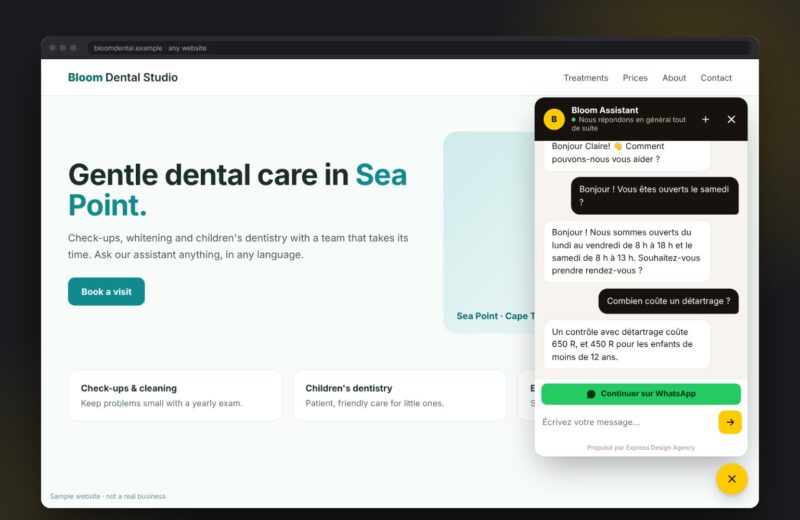
The difference between an AI chatbot and the old “press 1 for prices” bots is that visitors can type the way they talk. Someone can ask “do you do Saturday appointments and roughly how much is a full service?” and get a sensible answer, instead of a menu of buttons.
A good small business chatbot also answers in the visitor’s language. ED-ChatBot, for example, replies in English, French, Portuguese, Swahili, Zulu and more, so a customer who writes in their own language gets an answer in that language. We wrote more about why that matters in Why your website should answer in your customer’s language.
Where a chatbot earns its keep
Most small businesses don’t need a chatbot that does everything. They need one that takes the repetitive work off their plate. These are the jobs where it helps most:
- Answering the same questions 24/7. Prices, hours, directions, “do you deliver?” – the questions you answer ten times a day get answered instantly, even at 11 pm.
- Capturing leads. When a visitor is interested, the chatbot asks for a name and a way to reach them, so the enquiry doesn’t disappear when they close the tab.
- Handing hot leads to WhatsApp. Serious buyers are passed to your WhatsApp so you can close the conversation personally. See From website chat to WhatsApp: stop losing hot leads.
- Taking bookings with reminders. Visitors can book a slot in the chat and receive a reminder before the appointment.
- Asking for reviews and sending payment links. After a job, the bot can request a review; when a customer is ready to pay, it can share a payment link.
- Keeping your team in one Inbox. Every conversation lands in a team Inbox app, so anyone on your team can pick up where the bot left off.
What a chatbot doesn’t replace
A chatbot is not a substitute for you. It shouldn’t negotiate custom quotes, promise things you haven’t approved or handle a customer who is upset. Its job is to answer the simple questions well and get the right people to you faster.
That is why the rules you give it matter. Tell it what it may say, what it must never say and when to hand over to a human. Our post What a website chatbot should and shouldn’t say covers five rules we use for every client.
How much does an AI chatbot for small business cost?
Pricing is where many owners expect a nasty surprise. It doesn’t have to be expensive. ED-ChatBot has four plans:
- Free – 50 chats a month, enough to test it on a small site.
- Starter – $10 (R169) a month – 500 AI chats a month.
- Pro – $18 (R299) a month – 2,000 AI chats a month plus the WhatsApp bot.
- Customised – on request, for businesses with special workflows or higher volumes.
Every paid plan starts with a 7-day free trial, so you can see real conversations on your own website before you pay anything.
How to set one up in an afternoon
You don’t need a developer or a big project plan. Setting up a chatbot comes down to three steps:
- Teach it your business. Add your services, prices, hours, FAQs and policies. If you already have an FAQ page, that is a great starting point.
- Set the rules. Decide what the bot should collect (name, phone, email), when it should hand over to WhatsApp and which topics it should leave to you.
- Add it to your website. Paste a small snippet on your site – or install the plugin on WordPress – and the chat window appears.
Then spend the first week reading the conversations. You will quickly see which questions customers ask most and where the bot’s answers need a tweak.
Questions to ask before you choose a chatbot
Whichever tool you look at, these five questions will tell you if it fits a small business:
- Does it answer from my information, or make things up? It should stick to the facts you give it.
- Does it speak my customers’ languages? Especially important if you serve customers across Africa or abroad.
- Can it hand leads to WhatsApp? If your customers already live on WhatsApp, this is a must.
- Is pricing clear and predictable? Look for a free plan or trial and a monthly price you can explain to your accountant.
- Who helps me set it up? A tool with a real team behind it saves you hours.
You will find answers to the most common setup and billing questions on our FAQ page.
Is a chatbot worth it for a business your size?
If you regularly get enquiries after hours, answer the same questions all day or lose track of leads in your inbox, a chatbot will pay for itself in time saved. If you get a handful of messages a week, start on the Free plan and upgrade only when the volume is there.
We are also running a free pilot programme for five businesses until 31 January 2027. Pilot businesses get ED-ChatBot set up with our help, and we use their feedback to improve the product. [Placeholder: add a pilot result or client quote here once one is approved.]
Start your 7-day free trial
The quickest way to know if an AI chatbot is right for your business is to try one on your own website. Start your 7-day free trial and our team will help you set up ED-ChatBot – or ask about a place in the free pilot programme. You can also read more about the product on the ED-ChatBot page.